AI Receptionist for Small Business: How It Works, Costs and Setup
An AI receptionist answers your business calls 24/7, books appointments and takes messages. Here is how it works, what affects the price and how to set one up without a tech team.
An AI receptionist is a virtual phone assistant that answers your business calls 24/7, books appointments, answers common questions and takes messages, so you stop losing customers to voicemail. For a small business, it works like a front desk that never takes a break, at a fraction of the cost of extra staff.
If you run a clinic, salon, law office, home-service company or any business where the phone brings in customers, this guide explains how an AI receptionist works, what it can and cannot do, what affects the price and how to set one up step by step.
Key takeaways
- An AI receptionist answers every call, day or night, and handles routine requests on its own.
- It can book appointments directly into your calendar and send you a summary of each call.
- Price depends mostly on call volume and integrations, not on a salary.
- The best results come from a clear script, your real FAQs and simple hand-off rules.
What is an AI receptionist?
An AI receptionist is software connected to your business phone number. When someone calls, it answers with a natural voice, listens to what the caller needs and responds in real time. Unlike an old phone menu (“press 1 for sales”), the caller simply speaks, and the AI understands the request.
Behind the scenes it combines three things: speech recognition to understand the caller, a language model trained on your business information to decide what to say, and integrations with tools such as your calendar, CRM or booking system so it can actually get things done.
How an AI receptionist works
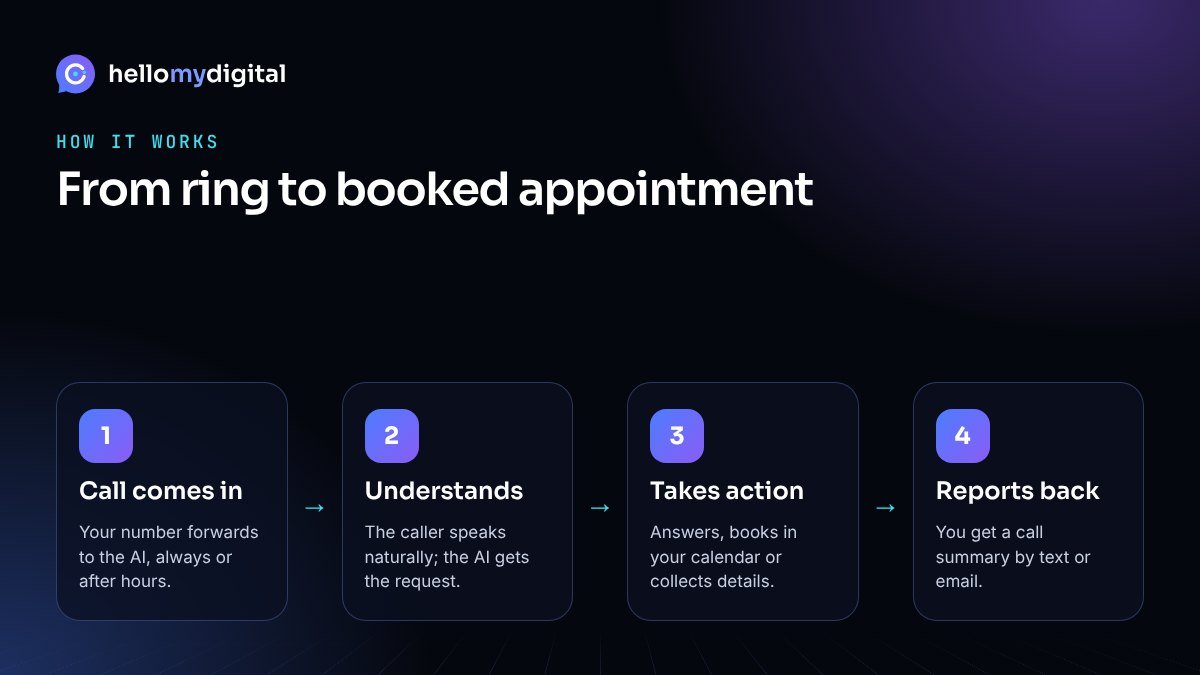
- The call comes in. Your number forwards to the AI receptionist always, after hours, or when your team does not pick up within a few rings.
- It understands the request. The caller says what they need in their own words: a booking, a price question, opening hours or something else.
- It takes action. It answers from your approved information, books or changes an appointment, or collects details for a quote.
- It hands over when needed. Urgent or complex calls are transferred to you, or the AI takes a detailed message.
- You get a summary. After each call you receive a short text or email summary, and the details can be saved to your CRM.
What an AI receptionist can do for a small business
- Answer calls 24/7, including evenings, weekends and holidays.
- Book, reschedule and confirm appointments in your calendar.
- Answer common questions about services, prices, location, parking and opening hours.
- Qualify new leads by asking the questions you choose, such as service needed, budget or ZIP code.
- Take messages and send them to the right person.
- Handle several calls at once, so callers do not hear a busy tone during a rush.
- Follow up by text with a booking link or confirmation after the call.
An AI receptionist works best together with other automation. Many businesses pair it with an AI chatbot for website and social media messages, and with AI automation that follows up with every new lead.
AI receptionist vs answering service vs voicemail
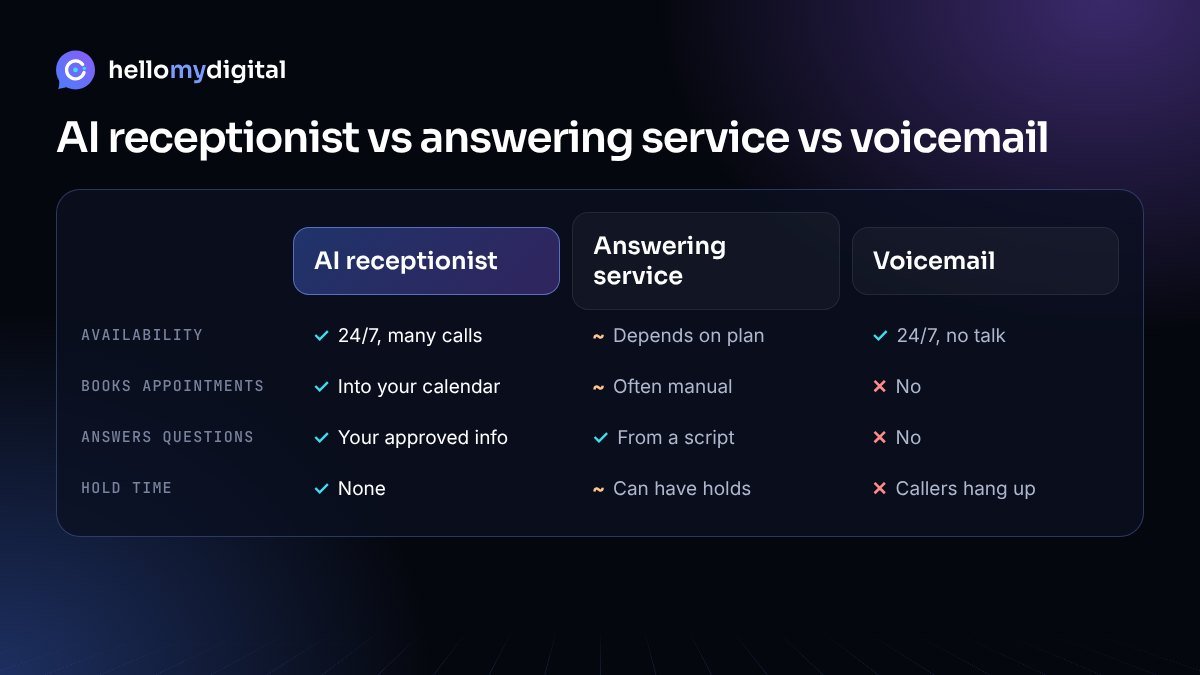
| AI receptionist | Live answering service | Voicemail | |
|---|---|---|---|
| Availability | 24/7, many calls at once | Depends on plan and staff | 24/7, but no conversation |
| Books appointments | Yes, directly in your calendar | Often, sometimes manually | No |
| Answers questions | Yes, from your approved info | Yes, from a script | No |
| Cost driver | Call volume and features | Minutes and staff time | Usually free |
| Caller experience | Instant answer, no hold | Human, may have hold times | Many callers hang up |
A live answering service still makes sense for highly sensitive or emotional calls. For routine calls that make up most of a small business’s phone traffic, an AI receptionist is usually faster and more consistent. If you decide an AI receptionist fits your business, our guide on how to choose the best AI receptionist walks through the feature checklist and test calls to run before you sign.
Which businesses benefit most?
Any business that books appointments or depends on inbound calls can benefit. Common examples include:
- Healthcare and dental clinics: bookings, reschedules and office information.
- Salons, spas and fitness studios: appointments and class questions.
- Home services such as plumbing, HVAC and cleaning: capturing jobs, including after-hours calls.
- Law and accounting firms: first-contact intake and consultation booking.
- Restaurants: reservations, opening hours and order questions.
- Real estate: property inquiries and viewing requests.
See how we adapt AI to different sectors on our industries page. For scripts, intake questions and handoff rules for each sector, read our guide to AI receptionist use cases by industry.
What does an AI receptionist cost?
There is no single price, because providers charge in different ways. Instead of comparing headline prices, look at what drives the cost for your business:
- Call volume or minutes: the biggest factor for most plans.
- Number of phone lines or locations.
- Integrations: calendar, CRM, booking software or payment tools.
- Custom call flows: lead qualification, transfers to different team members, multiple languages.
- Setup and ongoing management: writing the script, testing and improving it over time.
A simple way to estimate value: count the calls you miss in a normal week and multiply by what an average new customer is worth to you. If even a few missed calls turn into bookings, the system usually pays for itself.
How to set up an AI receptionist in 5 steps
- List your top call reasons. Check your call log or ask your team. Most businesses find that a handful of questions make up most calls.
- Write your business knowledge. Services, prices or price ranges, hours, location, policies and the exact answers you want callers to hear.
- Connect your tools. Calendar or booking software first, then your CRM or email for call summaries.
- Set hand-off rules. Decide which calls go straight to a person, which get a message, and how you want to be alerted.
- Test, then go live in stages. Start with after-hours calls, review the call summaries for a week, improve the answers, then expand.
Common mistakes to avoid
- Vague business information. The AI is only as good as the answers you give it.
- No human fallback. Always give callers a way to reach a person for urgent matters.
- Hiding that it is AI. Being open builds trust; most callers simply want a fast answer.
- Set and forget. Review summaries regularly and add answers to new questions.
Is an AI receptionist right for your business?
It is likely a good fit if you miss calls during busy hours or after closing time, your team spends a lot of time on the same questions, or you pay for ads and want every call answered. If most of your calls are complex consultations, start with after-hours coverage and lead intake, and keep live calls for the rest.
Want to see how it would sound for your business? Explore our AI receptionist service or book a free AI consultation.
Frequently asked questions
What is an AI receptionist?
An AI receptionist is software that answers phone calls with a natural-sounding voice, understands what the caller wants, and handles common requests such as booking appointments, answering questions and taking messages, 24 hours a day.
Can an AI receptionist book appointments?
Yes. When it is connected to your calendar or booking software, it can check available times, book or reschedule appointments and send the caller a confirmation.
Will callers know they are talking to AI?
Modern voices sound natural, but it is good practice to be open about it. Many businesses add a short line such as ‘I’m the virtual assistant for the business’ at the start of the call.
What happens when the AI cannot help a caller?
You decide the rules. It can transfer the call to you or a team member, take a detailed message, or send you an urgent text or email with a summary of the call.
How much does an AI receptionist cost?
Pricing usually depends on call minutes or call volume, the number of phone lines, and integrations such as calendars and CRMs. The best way to compare is to estimate your monthly calls and ask for a quote based on that number.
How long does it take to set up?
A basic setup with your hours, services, FAQs and calendar can often be ready in a few days. More complex call flows and integrations take longer.
Attiq Ur Rehman is a performance marketer with 9+ years of hands-on experience in Meta Ads, lead generation and e-commerce growth. He founded Hello My Digital to help small businesses use practical AI automation and data-driven marketing to win more customers.