AI Receptionist Use Cases by Industry: 8 Practical Examples
How dental offices, contractors, law firms, restaurants and four other industries use an AI receptionist: what it handles, what stays human and how to set it up.
An AI receptionist answers your business phone, handles routine requests and passes the rest to a person. The best use cases depend on your industry: dental offices use it for booking and reminders, contractors for capturing jobs after hours, law firms for intake screening, and restaurants for reservations and common questions.
Key takeaways
- Every industry has the same three call types: booking, questions and urgent calls. What changes is the script and the handoff rules.
- Appointment-based businesses (clinics, salons, auto shops) get value fastest because booking is repetitive and easy to connect to a calendar.
- Regulated fields need extra care: healthcare providers should ask about HIPAA and a Business Associate Agreement, and law firms must keep the AI away from legal advice.
- Start with the calls you miss most often, then expand once you have reviewed real transcripts.
If you are new to the idea, start with our guide on how an AI receptionist works for a small business. This article goes one level deeper and shows what it actually does in eight common industries, so you can picture it on your own phone line.
How AI receptionist use cases differ by industry
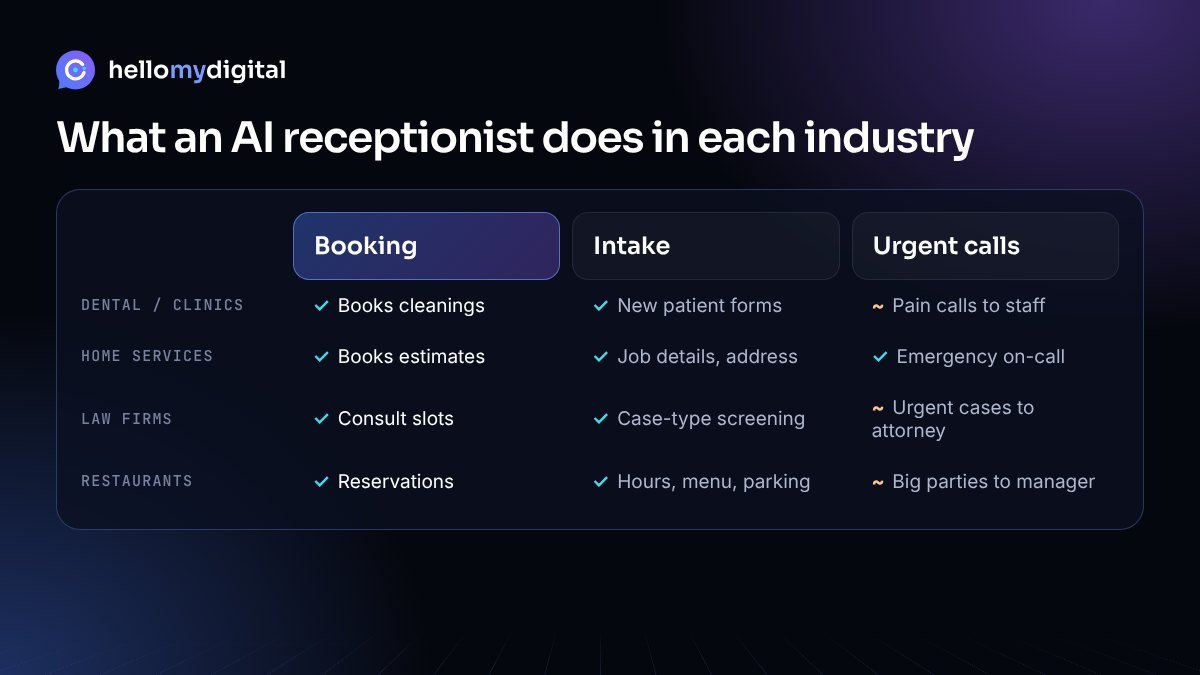
Most inbound calls to a small business fall into three groups:
- Booking calls: new appointments, reschedules and cancellations.
- Question calls: hours, location, pricing ranges you choose to share, services offered, parking, insurance or payment options.
- Urgent or high-value calls: emergencies, upset customers, large jobs or anything that needs judgment.
An AI receptionist can fully handle most booking and question calls. For urgent calls, its job is to collect the right details fast and route the call or message to the right person. The industry decides what “the right details” means.
1. Dental offices and medical clinics
Front desks in clinics juggle phones while checking patients in. Calls that come in during a busy hour, at lunch or after closing often go to voicemail, and many callers simply book elsewhere.
What the AI handles
- Booking cleanings, checkups and follow-ups into your scheduling system.
- Rescheduling and cancellations, then offering the open slot to the next caller.
- New patient intake: name, contact details, reason for visit and insurance carrier.
- Office hours, directions, parking and accepted payment methods.
What stays human
Clinical questions, pain or emergency calls and billing disputes should go straight to staff. Set a clear rule, for example: “If the caller mentions swelling, bleeding or severe pain, transfer to the front desk or the on-call line.”
Compliance note: if the AI will hear or store patient health information, ask the provider whether it supports HIPAA requirements and will sign a Business Associate Agreement (BAA). If it will not, keep the AI to scheduling and general questions.
2. Home services: HVAC, plumbing, electrical and contractors
For home service businesses, a missed call is often a missed job, because the customer usually calls the next company on the list. Owners and technicians are on job sites and cannot answer every ring.
What the AI handles
- Capturing the job: name, address, problem description and photos sent by text if your system supports it.
- Booking estimates or service windows on the dispatcher’s calendar.
- Answering service-area, hours and “do you work on this brand?” questions.
- Sending a text confirmation to the customer and a job summary to the team.
What stays human
True emergencies such as a gas smell, flooding or no heat in freezing weather. The AI should give any safety instruction you approve, then page the on-call technician. Large commercial bids are also best routed to the owner.
3. Law firms
Potential clients often call several firms and hire the one that responds first. At the same time, law firms have strict rules about what can be said on the phone.
What the AI handles
- Intake screening: case type, location, key dates and how the caller heard about you.
- Collecting the names needed for a conflict check.
- Booking consultations with the right attorney based on practice area.
- Explaining office hours, consultation format and what documents to bring.
What stays human
The AI must never give legal advice or predict outcomes. Script it to say something like “An attorney will review your situation” and to escalate anything time-sensitive, such as a court date this week, to a staff member right away.
4. Restaurants and cafes
During a rush, staff cannot stop to answer the same questions about hours and parking. Unanswered calls during service can mean lost reservations.
What the AI handles
- Taking and changing reservations through your booking platform.
- Hours, menu questions, dietary options you list, parking and wait times you choose to share.
- Texting a link for online ordering instead of taking orders by voice, if that suits your setup.
What stays human
Large parties, private events, catering requests and complaints. The AI should take the details and pass them to the manager.
5. Real estate agents and brokerages
Buyers who call about a listing expect a fast answer, and agents are often in showings.
- Answering listing questions from details you provide (price, beds, baths, HOA).
- Qualifying callers: buying or selling, timeline, pre-approval status, preferred areas.
- Booking showings and sending the lead to the agent’s CRM.
Negotiation, offers and advice on pricing stay with the agent.
6. Salons, spas and fitness studios
These businesses live on bookings and repeat visits. The AI can book services with specific staff, handle reschedules, explain cancellation policies and answer class schedule questions. Complaints about a service and special requests go to the manager.
7. Auto repair shops
Mechanics should be working on cars, not answering “is my car ready?” all day. The AI can book drop-off times, collect vehicle year, make and model plus the issue, give status updates if your shop software allows it, and share hours and towing options. Repair quotes and diagnosis stay with the service advisor.
8. Property management
Property managers get calls around the clock. The AI can log maintenance requests with unit number and description, answer leasing questions, book tours and route true emergencies such as leaks or lockouts to the on-call contact.
Comparison table: AI receptionist by industry
| Industry | Top use case | Key intake details | Always hand off | Connect to |
|---|---|---|---|---|
| Dental / medical | Booking and reschedules | Reason for visit, insurance carrier | Pain, emergencies, clinical questions | Practice management or scheduling software |
| Home services | After-hours job capture | Address, problem, urgency | Safety emergencies, big commercial bids | Field service or dispatch software |
| Law firms | Intake screening | Case type, dates, names for conflict check | Anything time-sensitive, any advice request | Case management or CRM |
| Restaurants | Reservations and FAQs | Party size, date, time | Events, catering, complaints | Reservation platform |
| Real estate | Lead qualification | Buy/sell, timeline, budget, area | Offers and negotiation | Real estate CRM |
| Salons / spas | Booking with staff | Service, preferred stylist | Complaints, special requests | Booking app |
| Auto repair | Drop-off booking, status | Vehicle, issue | Quotes and diagnosis | Shop management software |
| Property management | Maintenance requests | Unit, issue, access | Leaks, lockouts, safety | Property management software |
How to set up an AI receptionist for your industry
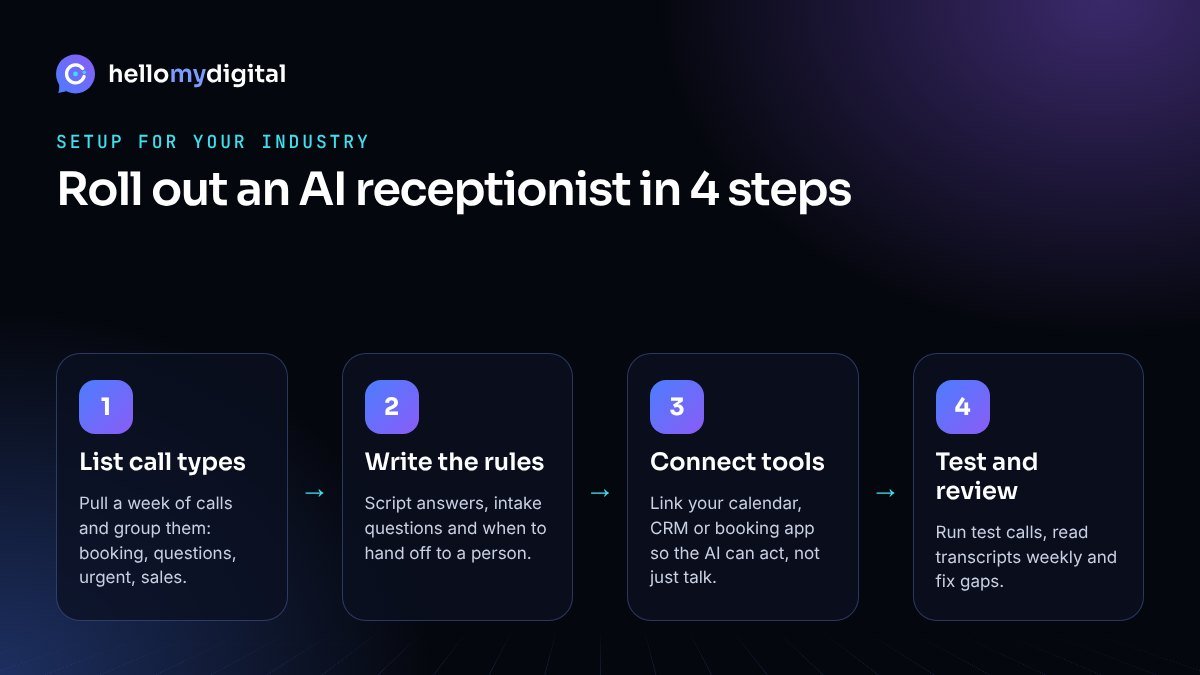
- List your call types. Look at a week of calls or voicemails and group them into booking, questions, urgent and sales. Note which ones you miss most.
- Write the rules. Give the AI approved answers, the intake questions for your industry and clear handoff triggers (“transfer if the caller mentions…”).
- Connect your tools. Link your calendar, CRM or booking platform so the AI can book and log calls, not just take messages. Our AI automation services cover these connections.
- Test and review. Make test calls with tricky questions, then read transcripts weekly for the first month and fix gaps.
Want a full walkthrough of options and pricing models? See our AI receptionist setup guide.
Mistakes to avoid
- Using a generic script. A plumber and a dentist need different intake questions. Industry-specific wording is what makes the AI sound competent.
- No emergency path. Every industry has calls that cannot wait. Define them and test the transfer.
- Letting the AI guess. If it does not know an answer, it should say so and take a message, not invent one.
- Ignoring call recording rules. Some US states require every party to consent to recording. Add a short disclosure at the start of calls and check the rules where you operate.
- Not connecting the calendar. An AI that only takes messages still leaves your team calling everyone back.
- Set and forget. Prices, hours and staff change. Review the knowledge base every month.
Which use case should you start with?
Pick the call type that costs you the most when it goes unanswered. For most clinics and salons that is booking. For contractors and property managers it is after-hours calls. For law firms it is fast intake. Start there, measure the results in your own call logs, then add more. When you are ready to compare providers, use our checklist on how to choose the best AI receptionist to test each option on your own calls.
At Hello My Digital we build AI receptionists that fit your industry, your tools and your handoff rules. Learn more on our AI receptionist service page, see how it pairs with a website AI chatbot, or browse the sectors we serve on our industries page. Ready to map your calls? Book a free AI consultation.
Frequently asked questions
What industries use AI receptionists the most?
Businesses that depend on phone calls and appointments use them most, including dental and medical clinics, home services like HVAC and plumbing, law firms, restaurants, real estate, salons and spas, auto repair shops and property management companies.
Can an AI receptionist handle emergency calls?
It can recognize emergency keywords you define, give approved safety instructions and immediately transfer or page your on-call person. It should not try to resolve an emergency on its own.
Is an AI receptionist HIPAA compliant for medical and dental offices?
It depends on the provider. If the AI will handle patient health information, choose a provider that supports HIPAA requirements and will sign a Business Associate Agreement. Otherwise, limit it to scheduling and general questions.
Can an AI receptionist give legal or medical advice?
It should not. Script it to collect details and pass advice questions to a licensed professional. This protects both the caller and your business.
What does an AI receptionist need to work well in my industry?
Clear approved answers, industry-specific intake questions, defined handoff rules and a connection to your calendar or CRM. Reviewing transcripts in the first weeks helps it improve quickly.
Attiq Ur Rehman is a performance marketer with 9+ years of hands-on experience in Meta Ads, lead generation and e-commerce growth. He founded Hello My Digital to help small businesses use practical AI automation and data-driven marketing to win more customers.